AZ-800 - Microsoft Server Hybrid Core Inf.
- Overview
- Powershell
- Domains, Trees, Forests
- Domain Controller AD Partitions
- Read-Only Domain Controller (RODC)
- Flexible Single Master Operations (FSMO)
- AD DS Users, OUs, & Groups
- Hybrid Identity Authentication & Entra Connect
- Group Policy
- Hyper-V
Overview
- Entra ID (formerly Azure AD) - PAAS
- Exchange Online - PAAS (Admin side) & SAAS (User side)
- Sharepoint Online - Paas (Admin side) & SAAS (User side)
- Intune (MDM) - Mobile Device Management, Across multiple OSs (Android, Windows, etc)
- SCCM (Older) - Windows only, Group Policy
Main system - Microsoft 365 - Sits on top of Azure
- Microsoft 365 - PAAS & SAAS
- Azure - IAAS
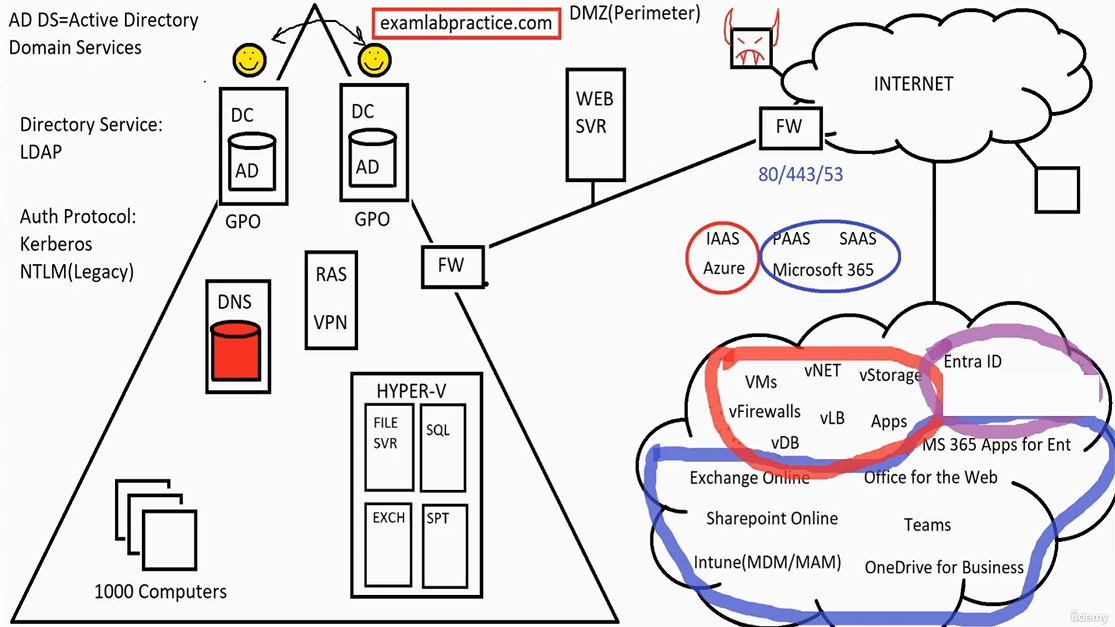
Microsoft Cloud
- Blue - Microsoft 365
- Red - Azure Infrastructure
- Purple - Microsoft 365 & Azure both share Entra ID (directory services)
Cloud Sync - SSO logs users in via on-prem D.C, and Entra ID via cloud (syncs out but not in)
- Entra Connect server (formerly Azure AD Connect) - link on-premise with cloud services
- Entra ID Sync (light weight version)
Powershell
| Verb-Noun | Structure |
| Verb-N... | Tab for intellisense |
| Stop-Service <inputObject> | Parameters are required |
Example:
Get-Eventlog -LogName System -Newest 5 | Format-List Out-File c:\log.txt
Remote Access via Powershell
| winrm quickconfig | brings the service on |
| Get-Process -ComputerName SVR | |
| Stop-Process | |
| Get-Service -ComputerName SVR | |
| Invoke-Command -ComputerName SVR -ScriptBlock {get-eventlog -LogName Security -Newest 5} | |
| Enter_PSSession -ComputerName SVR | |
| Exit | |
| Get-Process -ComputerName SVR,DC (runs on both) |
CredSSP
Scenario:
- Logged into ServerA, remote powershell to ServerB
- ServerB powershell command attempts to access ServerC
- Access is denied because credentials not passed from ServerB to ServerC
Credential Security Support Provider (CredSSP)
- CredSSP caches credentials on the remote server (ServerB)
- Opens up credential theft attacks if the remote server is compromised
- Disabled by default, only enable this in trusted environments
Integrated Scripting Environment (ISE)
| Get-Variable | |
| $Number1 = 5 | Stores the value in a new variable |
| $Number | outputs 5 |
| $Name = "SVR" | Can now use -ComputerName $Name |
| ISE |
opens integrated scripting environment (click show script pane) |
| $name = Read-Host "Which computer would you like to connect to?" | |
| $log = Read-Host "Which log would you like to see?" | |
| $amount = Read-Host "How many of the newest entries would you like to see?" | |
| Get-Eventlog -ComputerName $name -LogName $log -Newest $amount |
Domains, Trees, Forests
Domains, Trees & Forests
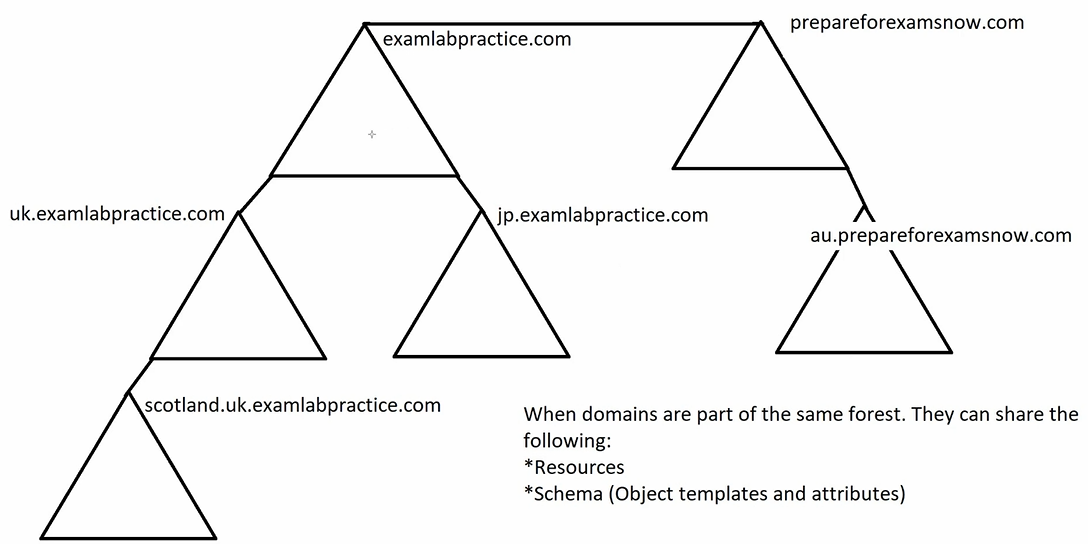
- Every Domain is part of a Tree, is part of a Forest (even a single domain)
- Domains which share the parent domain name belong to the same tree
- Trust Relationships connect domains
- Forest Root (Root Domain) - First domain, cannot change
- Enterprise admins control entire forest
- Domain admins control their domain
- Trees later merged via forest trust will share resources but not schema
- Global catalogue is replicated across the whole forest
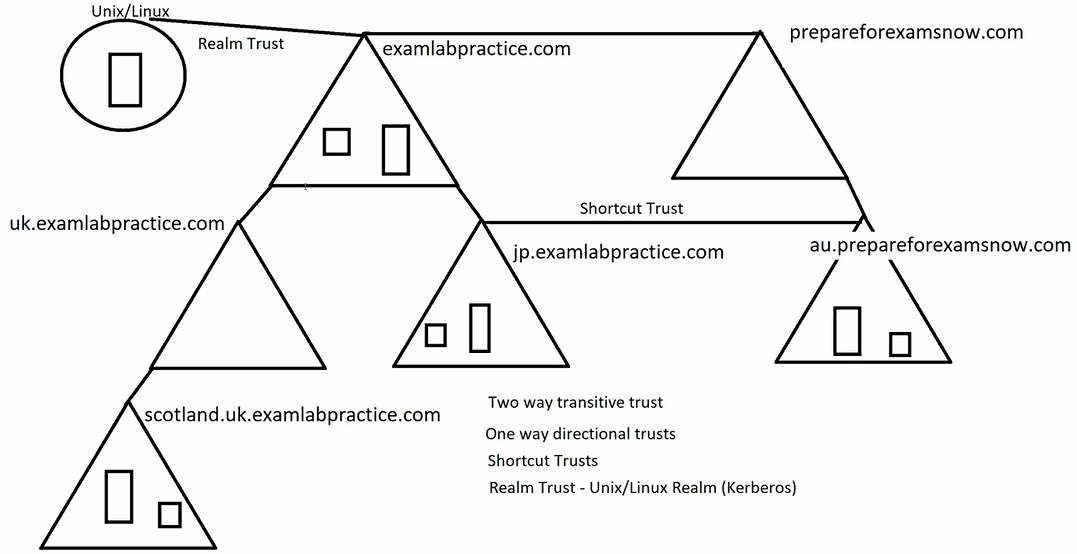
Trusts
- Trust Relationships can have a
- Two-way transitive trust (follows through to sub-domains)
- One-way directional trust
- Shortcut trust (can be either of the above) (two or one way)
- Forest trust - between two forests (unlike below) (two or one way)
- Realm trust - Unix/Linux Realm (Kerberos)
Setup via Active Directory Domains and Trusts
Configure DNS to ensure they can communicate (conditional forwarders)
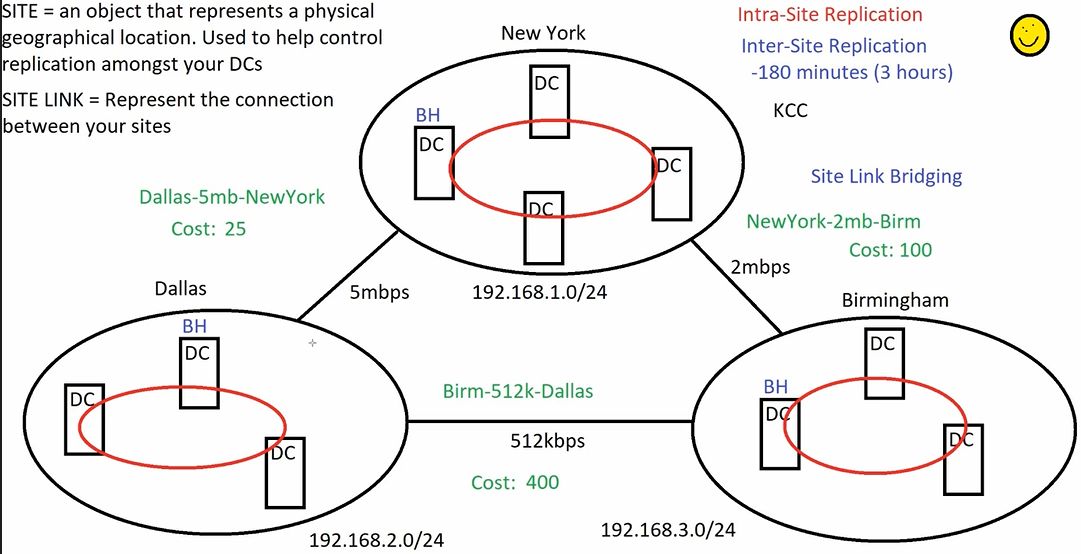
KCC
- Knowledge consistency checker - all D.Cs have it
- Creates a circular ring of trust between D.Cs in close proximity (latency) within the same site (intrasite replication)
- Updates based on D.C. Availbility, checks every 15 minutes
Separation of sites frees up bandwidth.
KCC Creates new rings within each site and appoints one D.C. as a Bridge Head (every 180 minutes) (can be altered) (Inter-Site Replication)
Site Links
- Redundant site links are setup, each have a cost (default 100)
- Adjust cost based on primary and secondary links
- IP Addresses are set such that devices interact with their local D.C. (Subnets)
- Site link bridging can be setup based on a hierarcy (default all on)
- May wish to disable site link bridging where a site has multiple sub-sites
Configured and Managed via AD DS > Sites
Domain Controller AD Partitions
Active Directory Partitions
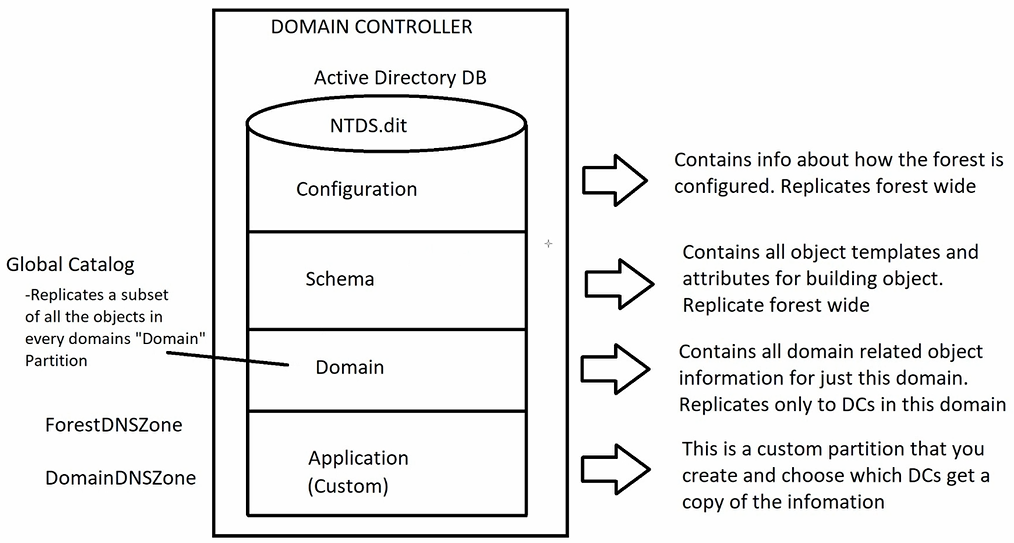
Global Catalog Server
- Not all Domain Controllers must be Global Catalog Servers
- All Global Catalogue Servers must be Domain Controllers
- Ideally have a GCS in every site D.C but adds replication load
Configured in Active Directory Sites and Services > Services > DC > NTDS Settings > Properties > Tick "Global Catalog"
Read-Only Domain Controller (RODC)
Read Only Domain Controller (RODC)
- Receives replication (one way), does not store login information, authenticates via the main D.C.
- May only carry local credentials for immediate staff, no admins
- Used under specific circumstances
- Can also perform DNS
Scenario
- A smaller office with less employees may find it is slow to log in due to having to authenticate with the D.C from another site
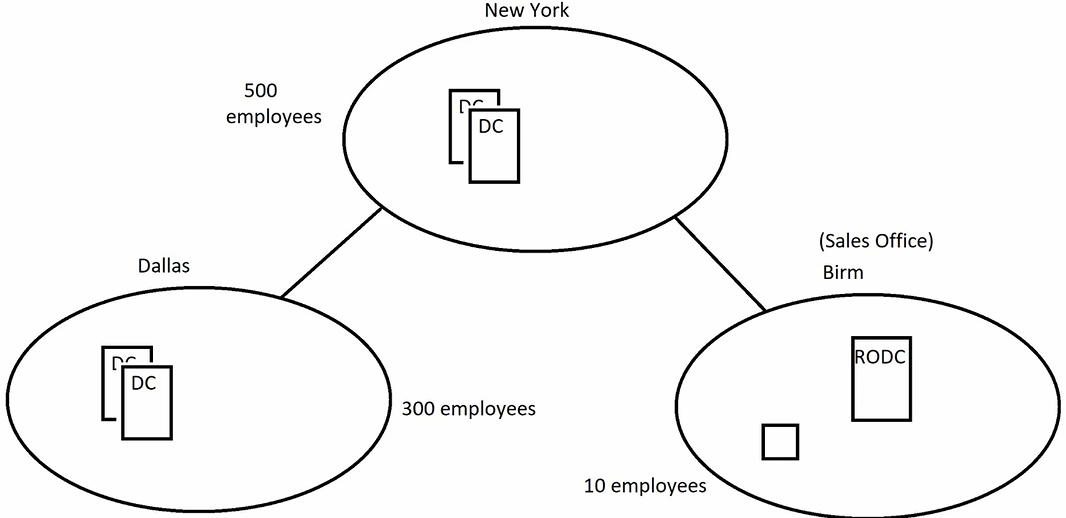
How to setup: (would normally be done via RDP or install locally and ship it to the location)
- On a Domain Controller
- Active Directory Users and Computers
- Right click Domain Controllers > Pre-create a read-only Domain Controller account
- Specify User/Group to be able to log in
- Finish
- Right click > Properties > Password replication policy
- Allowed RODC Password Replication Group
- Add local users' credentials to this group (non admins)
- Log into the other server
- After installing ADDS, when promoting the server to a D.C., Tick "RODC"
- Complete Setup
Flexible Single Master Operations (FSMO)
Flexible Single Master Operations (FSMO)
- Certain roles / jobs that can't have multiple writeable copies (conflicts)
- Every D.C has a read only copy of all roles, for recovery
- Seizing converts a read only copy of one of the above roles to a writeable copy
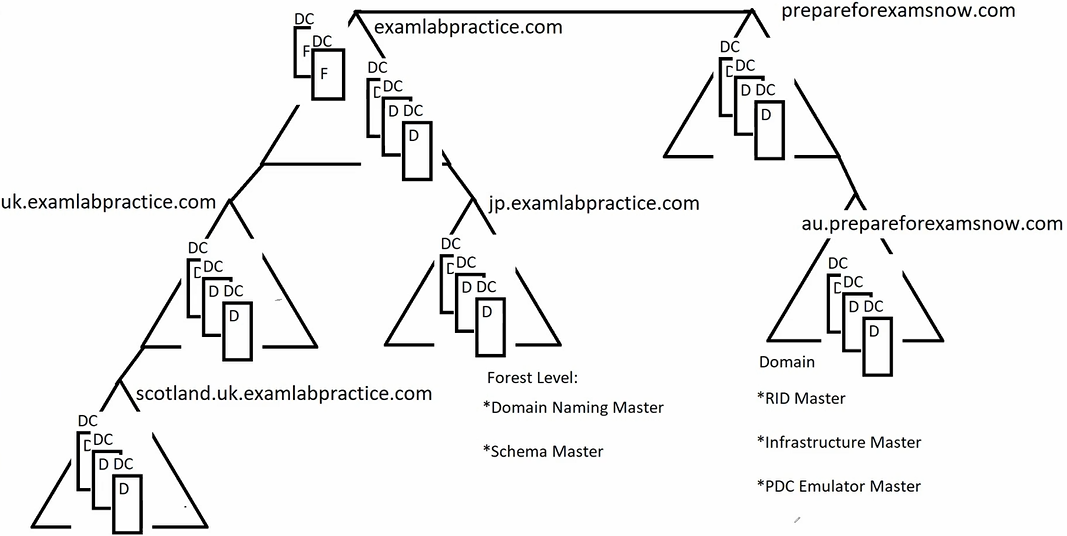
- 5 FSMOs
- Forest level (these will generally live in the root)
- Domain Naming Master - Config. Partition of AD - Trust Relationships, Unique Domain Names
- Schema Master - Master copy of schema database (must be registered)
- Domain Level (read only copy lives on every D.C.) - can be recovered via transfer and seizing
- RID Master - Ensures unique identifiers for every object in domain
- Infrastructure master - allocates groups/resources across different domains
- PDC Emulator Master - Passwords, time, GPO replication across domains
- Forest level (these will generally live in the root)
AD DS Users, OUs, & Groups
Users and OUs
Organisational Units - a means of separating users and devices/objects based on location, site, role, job, department
- A user account can only be a part of one OU (unlike groups)
- OUs can be used to handle Group Policy objects - will filter down to OUs below the specified OU
- Helps to visually separate objects
Example 1
- Sydney OU
- Users
- Computers
- Brisbane OU
- Users
- Computers
Example 2
- Sales OU
- Users
- Computers
- Finance OU
- Users
- Computers
Groups
- Dsitribution Groups (DLs) for Email
- Security Groups (Permissions) and Email
Group Scopes
- Global
- Domain Local
- Universal
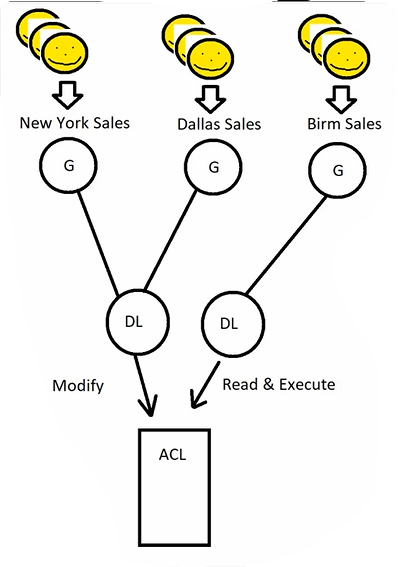
Microsoft Strategy
- Accounts
- Global
- Domain Local
- Permissions
- Domain Local
- Global
Universal Groups
*For larger organisations multiple globval groups can be linked to a single universal group, which is replicated across all domains
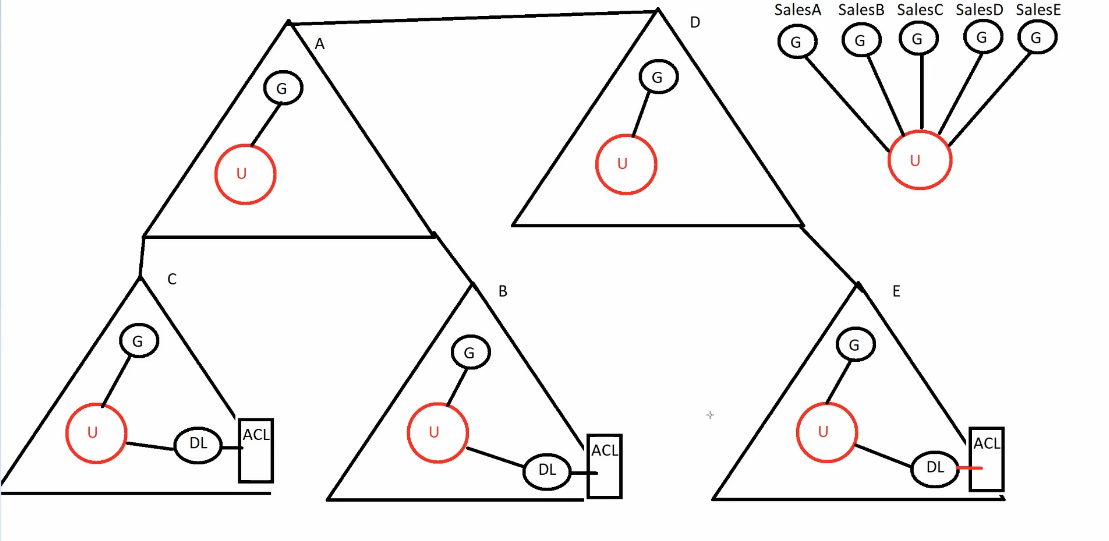
Universal Group Membership Caching Feature
- Global Catalog Servers contain a Universal Group List
- User Authentication occurs on D.C.s via Kerberos
- Kerberos needs to validate with the GCS to identify which groups this user is a member of (via the universal group list)
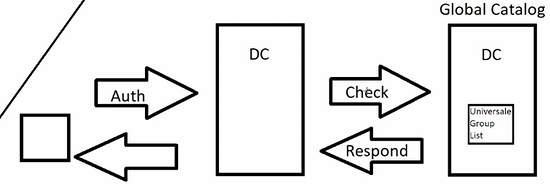
Scenario: users are finding it take a long time to log in - the global catalog server might be located in a different site to where the user and the domain controller are located
Solutions
- Make the D.C. a Global Catalog server (adds processing overhead)
- Universal Group Membership Caching
- Every 8 hours (default) domain controller will cache the Universal Group List locally
Hybrid Identity Authentication & Entra Connect
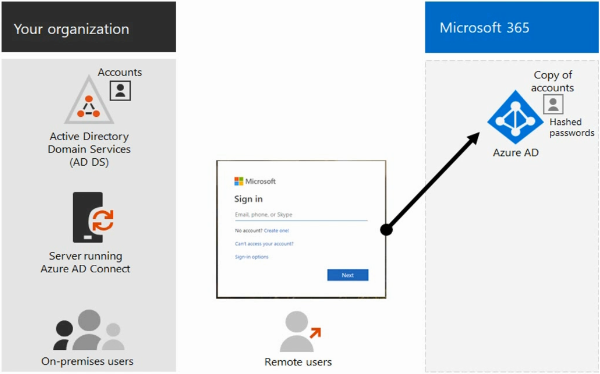
Hybrid identity model & directory synchronisation is the most common for enterprise users
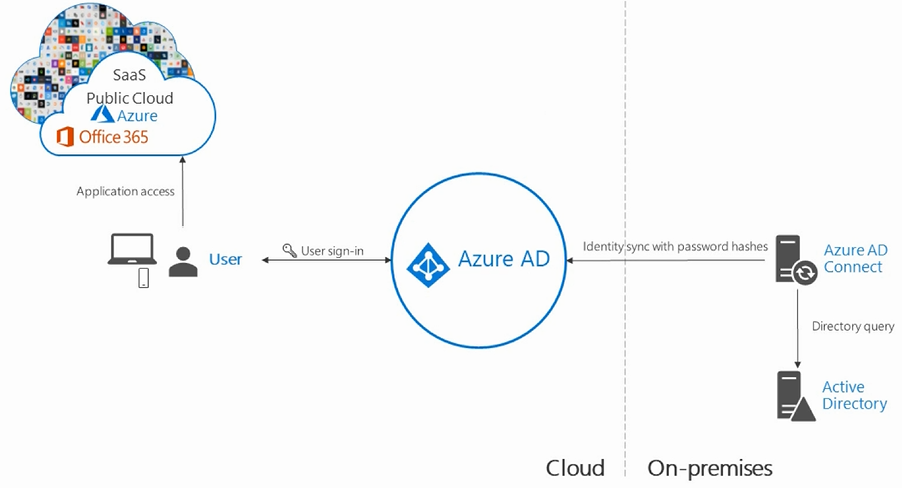
- Directory synchronisation allows updates to AD DS to synchronise with the Entra ID
- AD DS identities are synchronised with Microsoft 365 and users are managed on-prem
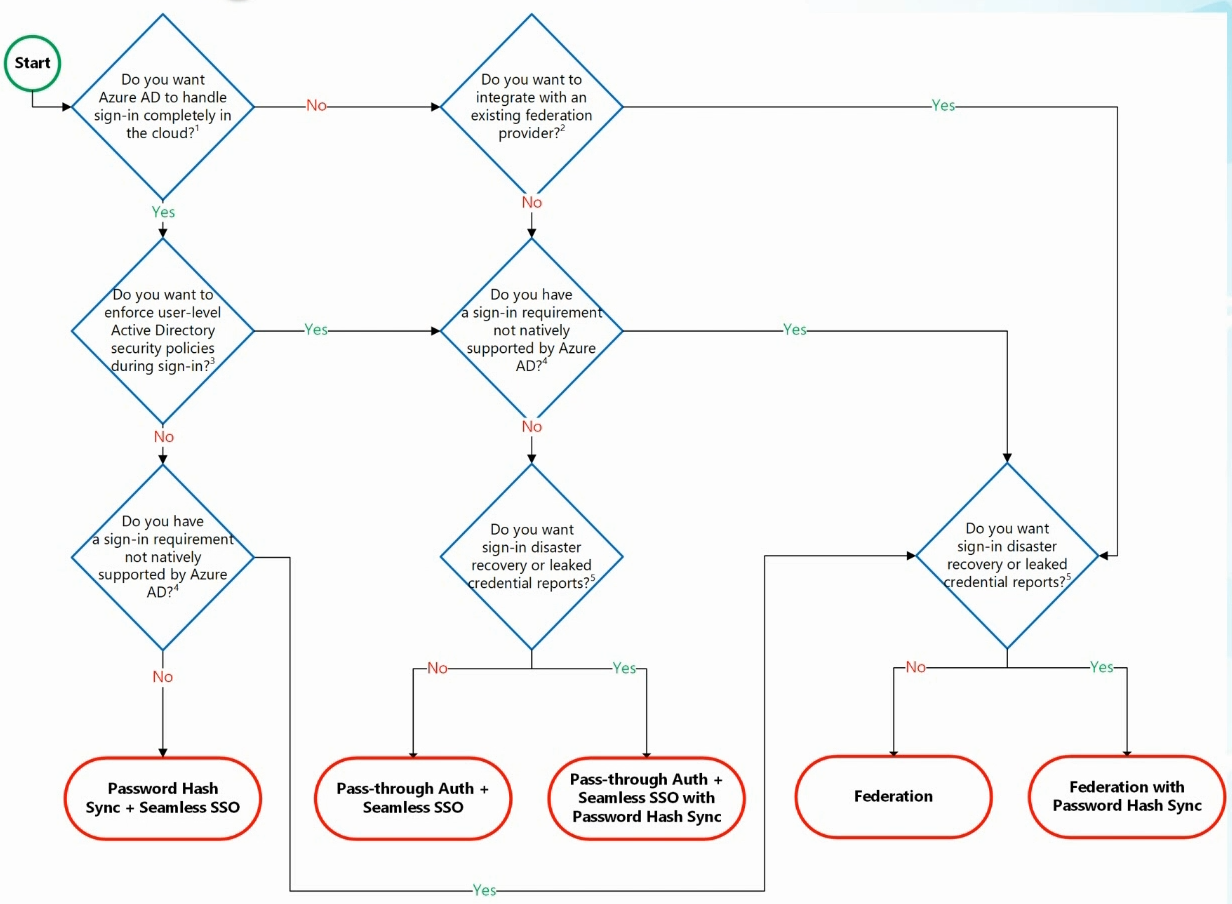
Managed Authentication
Password Hash Synchronisation (PHS) (Recommended)
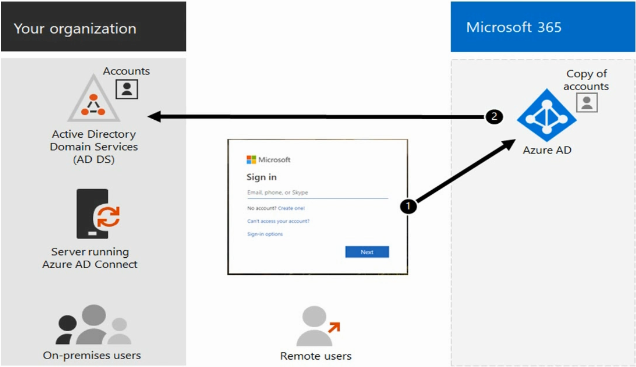
Entra ID handles authentication using a locally hashed password
- Password hashes are synchronised out from AD DS to Entra ID so that users have the same password
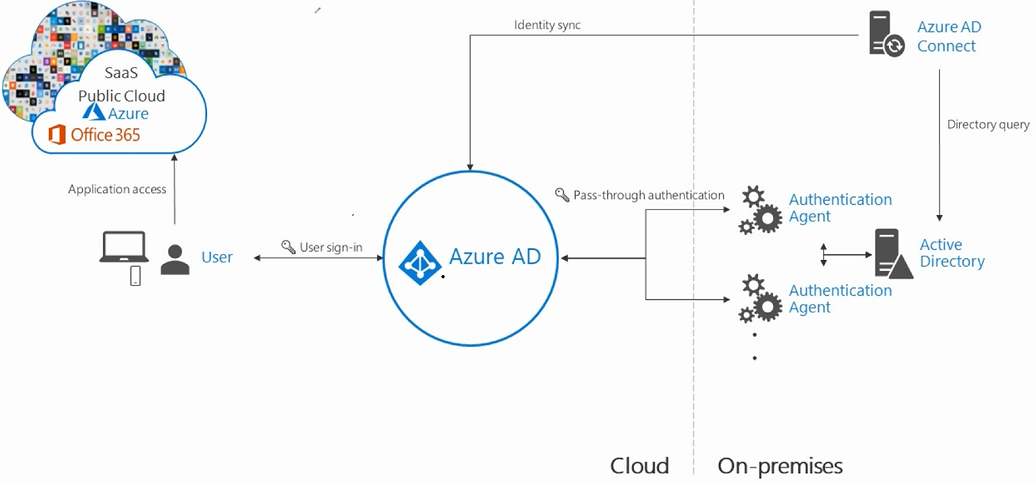
Pass-Through Authentication (PTA)
Entra ID sends the credentials to an on-prem software agent to be authenticated by AD DS
Federated Authentication
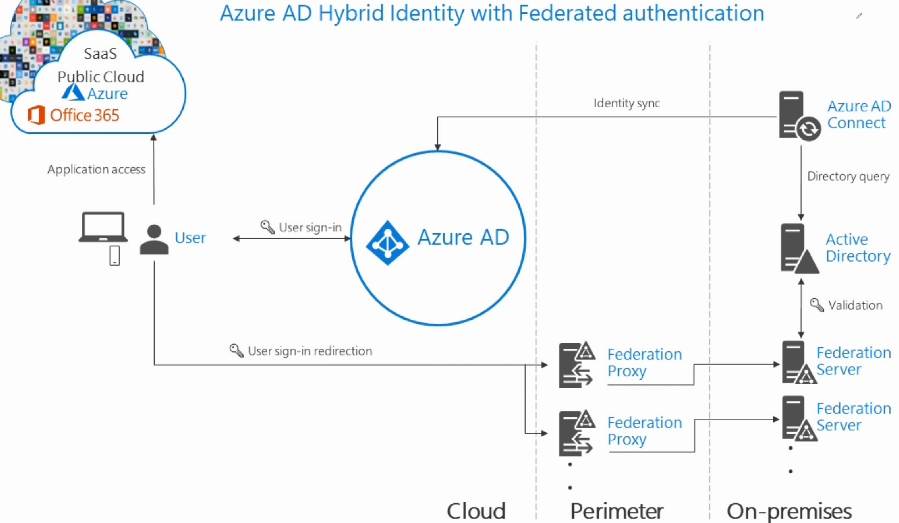
Federated Authentication - Entra ID redirects the client's authentication request to another identity provider
- Primarily for large enterprises with more complex requirements
- Users have the same password on-prem and in the cloud and do not have to sign in again to use 365
- Supports additional requirements such as smartcards or third party MFA
Group Policy
Group Policy
Policies are filtered down:
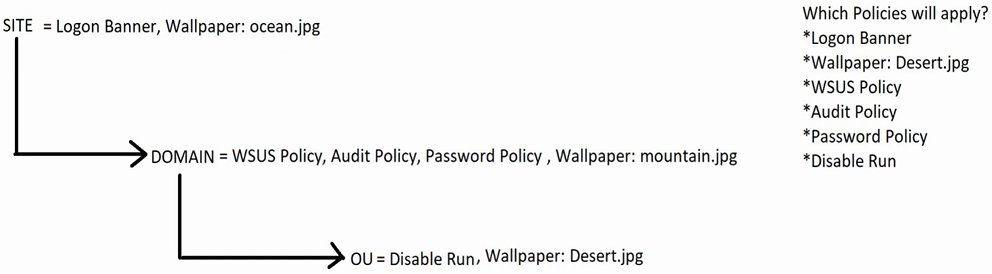
- Block inheritance - applied at a level to block all policies (except password policies) from above
- Enforced - applied at a level to overwrite below policies (ignores block inheritance)
Hyper-V
- Nested Virtualisation - Allows enabling of Hyper-V inside a virtual server to create nested virtual servers
- Enhanced session mode - Allows utilisation of local resources from host machine inside virtual machines
- Integration services
- Operating system shutdown
- Time synchronisation
- Data exchange
- Heartbeat
- Backup
- Guest Services
- Discrete Device Assignment - pass PCIe devices into a VM
- Resource Groups - Allow management of multiple VMs (similar to Azure RGs)